AI coding agents: the production questions Claude Code forces you to answer
AI coding agents are not interesting because they can autocomplete a function. We already had that.
They are interesting because they can act.
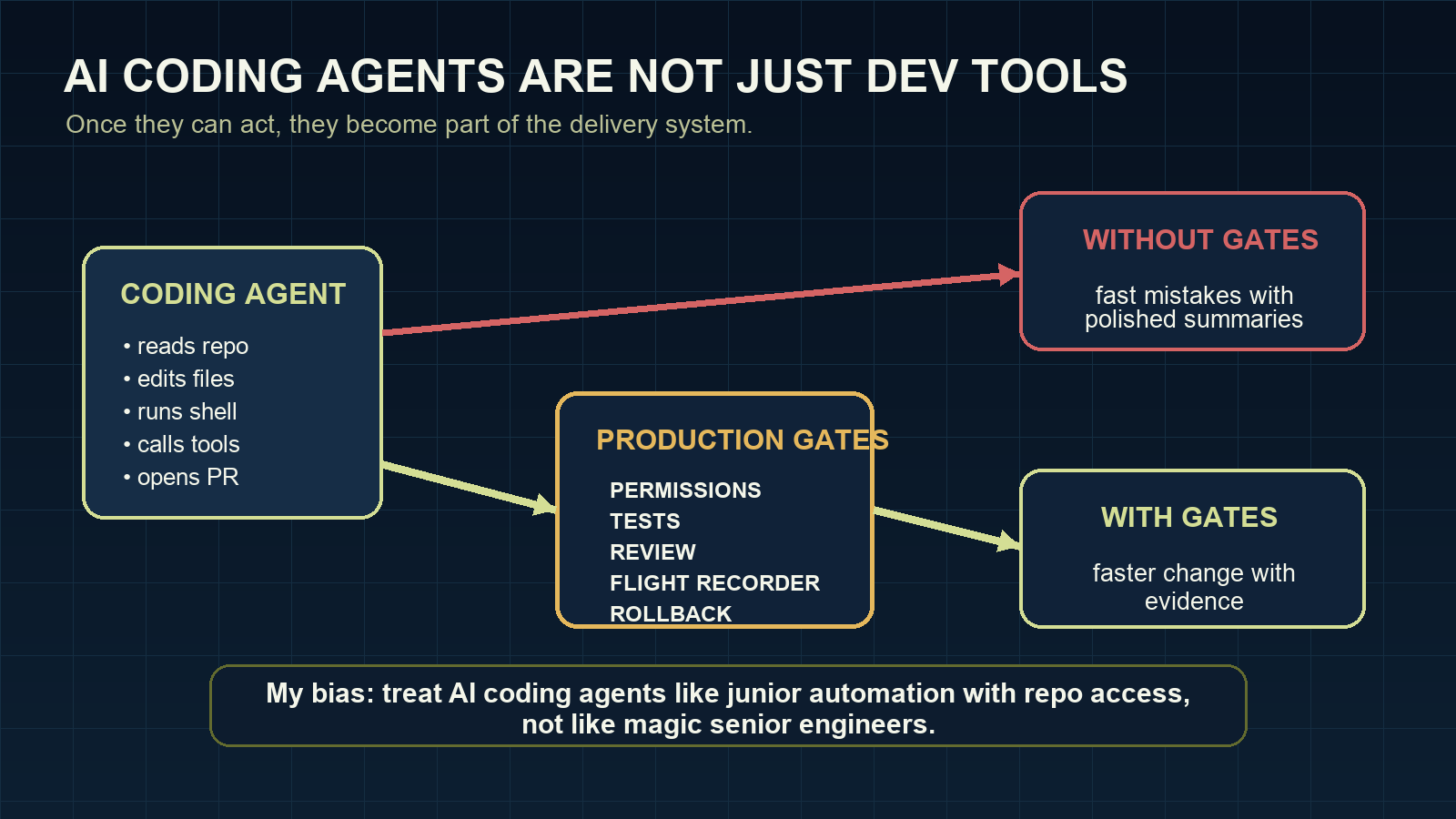
And once they can act, I stop thinking of them as “developer tools” in the harmless plugin sense. I think of them as junior automation with repo access: useful, fast, occasionally impressive, and absolutely capable of making a mess if the surrounding system is vague.
A coding agent can read a repository, make a plan, edit files, run commands, inspect errors, try again, and produce a pull request. Claude Code does this from the terminal. Other tools do it from IDEs, CLIs, hosted sandboxes, or agent frameworks. The interface varies, but the important change is the same: the model is no longer just producing text. It is participating in the software delivery workflow.
That makes the tool more useful. It also makes the failure modes more expensive.
The question is not “which agent is best?”
Search for AI coding agents and you will find comparisons: Claude Code versus Cursor, Codex, Copilot, Cline, OpenCode, Gemini CLI, and the next tool that shipped last Tuesday.
Those comparisons are useful up to a point. Setup speed matters. Cost matters. Model quality matters. Tooling matters.
But I think the tool-ranking conversation is already overrepresented. It is comfortable because it lets us avoid the harder question.
If you are responsible for a real codebase, the better question is not which agent wins a benchmark. It is whether your engineering system can absorb agent-created change safely.
A strong AI coding agent in a weak workflow is still a weak workflow.
For the evaluation part of that workflow, AI Agent Evals explains how to test agent actions and changed state, challenge graders and decide which evidence should block a release. It includes a dedicated chapter on evaluating coding agents.
What changes when the agent has tools
Once an agent can use tools, every permission becomes a product decision.
File access decides what the agent can inspect or damage. Shell access decides what it can execute. Network access decides what systems it can reach. MCP servers and internal APIs decide whether the agent can cross from code into business operations. CI access decides how close it can get to deployment.
This is why I do not like treating AI coding agents as only a developer productivity category. They are closer to junior automation with a large vocabulary and uneven judgment.
That is not an insult. It is a design constraint. If that sentence feels harsh, good. The softer framing is how teams end up giving a chatbot-shaped process more access than they would give a script written on a Friday afternoon.
You would not give a new automation script unlimited access to secrets, deploy paths, and production data because it completed one happy-path task. Coding agents deserve the same discipline.
Six checks before a coding agent touches a serious repo
Before Claude Code or any AI coding agent works on a serious repository, I want clear answers to six questions.
1. What can it read?
Can it inspect .env files, SSH keys, cloud credentials, customer exports, local config, or private documentation? If the answer is “probably not”, the boundary is not explicit enough.
2. What can it write?
A small edit in the task folder is different from changing CI, package manifests, migrations, generated files, or deployment scripts. The workflow should know the difference.
3. What can it execute?
Shell access is where harmless-looking coding assistance becomes real system access. The agent does not need bad intent to run the right command in the wrong place.
4. What can it call?
Network and MCP access should start narrow. An AI agent framework connected to broad internal tools can become a very capable mistake machine.
5. What evidence does it leave?
A summary is not enough. The useful evidence is the task, files touched, commands run, tests executed, approvals, and rollback notes.
6. Who reviews the risk?
Human review should not be theatre. If every approval is a reflex click, the workflow has not kept a human in the loop. It has added a button.
Why Claude Code is a good forcing function
Claude Code makes these questions hard to avoid because it works close to the repository. It can read context, change files, run tests, and iterate. That is exactly why people like it.
It is also why the production setup matters.
The same feature can be safe or reckless depending on the boundary around it. Running tests is useful. Running arbitrary commands from the wrong directory is not. Editing code is useful. Editing generated files, secrets, or deploy config without a gate is not. Opening a pull request is useful. Hiding uncertainty inside a polished summary is not.
The tool is not the strategy. The operating model is.
My strongest opinion here: a team that cannot describe its permission model, review model, and rollback model is not ready for autonomous coding agents. It may still use them. It should just be honest that it is experimenting, not operating.
Where AI coding agents can help first
I would not start by pointing a coding agent at the riskiest part of the system.
Better starting points:
- small refactors with strong tests
- documentation fixes tied to code changes
- test generation for well-bounded modules
- dependency updates in disposable branches
- repetitive migration prep with human review
- issue triage that produces plans, not direct changes
These are not boring because they are small. They are useful because they let the team learn the agent’s behavior while the blast radius is low.
Then the team can expand autonomy based on evidence, not optimism.
The future is not hands-off coding
I do not think the best teams will be the ones that remove engineers from the loop. The better pattern is different: engineers stop spending attention on mechanical work and spend more attention on boundaries, tests, architecture, and review.
That is still engineering. In some ways it is more obviously engineering than typing every line by hand.
AI coding agents will make software development faster in many places. They will also punish vague ownership, weak test suites, sloppy permissions, and review habits that were already too shallow.
Claude Code is a powerful tool. Treat it like one.
That means fewer breathless tool rankings and more uncomfortable operational questions. Who owns the change? What did the agent actually do? What did it skip? What would make us roll it back? Those questions are not bureaucracy. They are the price of using powerful tools in serious systems.
If you are building this into a team workflow, start with the Claude Code production readiness checklist. I am expanding the full operating model in Claude Code: Building Production Agents That Actually Scale.
Related reading: Claude Code permissions: the production mistake that bites later, Claude Code evals should start with bad runs, Claude Code agents need a flight recorder, the Claude Code review packet I want before approving agent work, and Claude Code is not the product. The production loop is..