Last checked: 1 November 2026, against the Claude Code docs and changelog up to v2.1.314.
Short answer: it depends on how the machine is set up. With managed settings, or a Team or Enterprise /login, a built-in guard loads first and, by default, a user’s mod cannot approve a call that a deny rule refuses, an ask rule would prompt for, or a PreToolUse hook blocked. Without that guard, a mod can approve those calls. In every setup, a mod’s own file, process and network calls sit outside your permission rules.
Anthropic launched mods on 1 October 2026 (launch article). The docs explain every setting well. This page turns them into a decision for a team lead: which setup you are in, which policy to pick, how to check it on a real machine, and what is still not covered.
What a mod is
A mod is a plugin made of JavaScript or TypeScript event handlers that Claude Code calls inside its own process (Mods overview). It installs like any other plugin, from a marketplace, for example /plugin install name@marketplace. Mods are on by default: the overview gives Claude Code v2.1.287 or later in the terminal and v2.1.286 in the Desktop app, while the admin page says v2.1.286 and later. Their hooks run in the terminal, the Desktop Code tab (not in WSL sessions), the VS Code extension, claude -p and the Agent SDK, Remote Control and cloud sessions.
The part that matters for a security decision is what a mod can reach. The overview lists it plainly. Once loaded, a mod can:
- read and write any file your user account can, start programs, and make network requests
- read environment variables and settings files, including API keys
- see every prompt and every tool call
- rewrite prompts and tool calls, or submit a prompt as you
- approve a tool call before you are asked
- spend your usage through model calls
Mods are not sandboxed. If you turn sandboxing on, it isolates the Bash commands Claude runs, but a process a mod starts runs outside it. One thing a mod cannot do is change what the permission prompt shows.
Treat installing a mod the same way you treat widening a permission. It is code running as the user, with the user’s access.
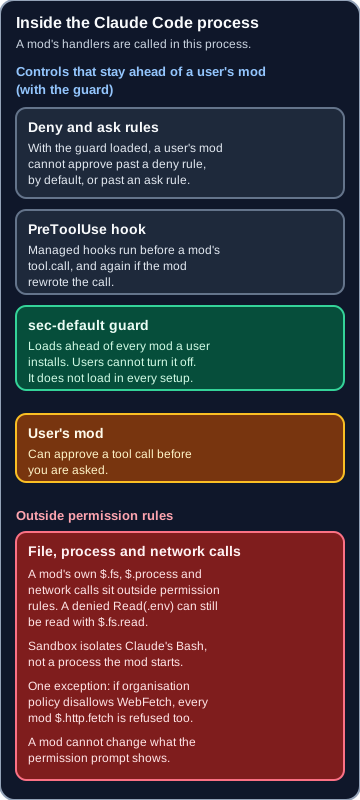
Where a mod runs, and which calls skip permission rules.
Can a mod approve a call your permissions block?
This is the question most teams will ask first. The answer comes from the Extend permissions with hooks section of the permissions docs and the admin page.
The key is a built-in mod called sec-default@builtin, listed in /plugin and the debug log as cc-plugin-sec-default. It loads ahead of every mod a user installs, and users cannot turn it off. But it only loads when the machine has managed settings, or when the session uses a Team or Enterprise /login.
| Your setup | Guard loads? | Deny rule | Ask rule or blocking PreToolUse hook |
|---|---|---|---|
Team or Enterprise /login | Yes | Mod cannot approve past it (by default) | Mod cannot approve past it |
| Any login, machine has managed settings | Yes | Mod cannot approve past it (by default) | Mod cannot approve past it |
| API key, Bedrock, Google Cloud’s Agent Platform or Microsoft Foundry, no managed settings | No | Mod can approve the call | Mod can approve the call |
Long-lived CLAUDE_CODE_OAUTH_TOKEN, no managed settings | No, even if a Team login is stored | Mod can approve the call | Mod can approve the call |
A few details sit under that table:
- Deny can be loosened on purpose. The guard option
allowModsToOverrideDenyRules: truelets users’ mods approve calls a deny rule refuses. LeaveallowModsToOverrideDenyRulesunset. - Auto mode. A call a mod approves runs without a classifier check, unless the guard is loaded and the session uses
--permission-prompt-toolor an Agent SDKcanUseToolcallback. Then the classifier checks the call first. - Plan mode. A mod cannot approve a call that is not read-only, such as a file edit.
- Without the guard, your
--permission-prompt-toolorcanUseToolcallback is not asked about a call the mod approves.
If your developers use API keys or a cloud provider and you have never deployed managed settings, the bottom two rows describe your team today.
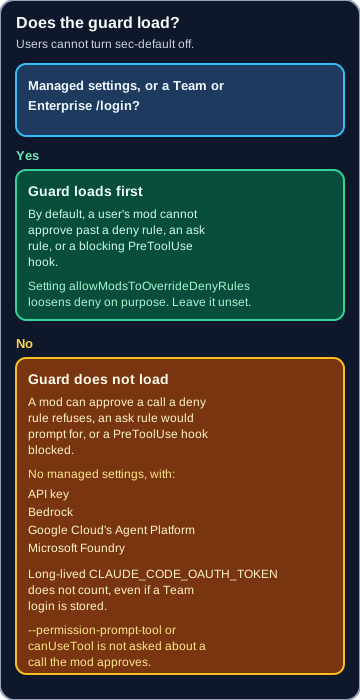
When the guard loads, and when a mod can approve past your rules.
The gap your permission rules do not cover
Put this in front of every security reviewer. Permission rules and PreToolUse hooks apply to Claude’s tool calls. They do not apply to a mod’s own $.fs and $.process calls. The admin docs give the example directly: with Read(.env) denied, a mod can still read that file with $.fs.read, or start a program that does.
Network is similar:
- If your organisation’s policy does not allow WebFetch, Claude Code also refuses every mod’s
$.http.fetchrequest. - If you only turned WebFetch off with
CLAUDE_CODE_DISABLE_WEB_FETCHor aWebFetchdeny rule, mods can still make$.http.fetchrequests. - Nothing in that list covers a program a mod starts with
$.process.run. It reaches the network with the user’s own access.
The guard does not close this gap either. Only two things do: keep users’ mods from loading, or handle those calls in a policy mod of your own.
What a mod can reach, against what permission rules cover.
| A mod can | What the rules cover |
|---|---|
Read or write files with $.fs | Permission rules and PreToolUse hooks do not apply. A denied Read(.env) can still be read with $.fs.read. |
Start a program with $.process | Not covered. Sandbox isolates the Bash commands Claude runs, not a process a mod starts. |
Call $.http.fetch | Refused when organisation policy does not allow WebFetch. A WebFetch deny rule or CLAUDE_CODE_DISABLE_WEB_FETCH does not stop it. |
Reach the network with $.process.run | Not covered. It uses the user’s own access. |
| Read environment variables and settings, including API keys | Listed as reach. Not named as something permission rules cover. |
| See every prompt and tool call, rewrite or submit a prompt, and spend usage | Listed as reach. Not named as something permission rules cover. |
| Approve a tool call before you are asked | With the guard, a user’s mod cannot approve past a deny rule, by default, or past an ask rule or a blocking PreToolUse hook. Without the guard, it can. |
| Change the permission prompt | It cannot. |
Pick a policy
The admin docs give a policy table. Here it is as a decision, from tightest to loosest:
- No installed mods, settings hooks untouched. Set
allowManagedModsOnlyon the guard and deploy no mods of your own. A team that has not reviewed any mods yet should start here. - Only your organisation’s mods. Set
allowManagedModsOnly, install your own mods so they count as yours, and adddisableSideloadFlags. - Any mod from marketplaces you approve. Keep your marketplace restrictions and set
disableSideloadFlagstotrue. - Any mod, with your own mod checking the others. Install your policy mod and list it with
sec-default@builtininprependPlugins.
The setting for option 1 goes in managed settings:
{
  "pluginConfigs": {
    "cc-plugin-sec-default@builtin": {
      "options": { "allowManagedModsOnly": true }
    }
  }
}
The guard reads it from managed settings only, so the same entry in a user, project or local file changes nothing. Users’ settings hooks, status lines and /goal keep working.
Three traps worth knowing before you choose:
disableAllHooksremoves a control. It is the widest switch. In managed settings it stops every mod, yours included, and turns off every settings hook, so your managedPreToolUsehook no longer blocks anything. Only use it if you really want no hooks at all.prependPluginsreplaces the default list. If you set it, you must listsec-default@builtinyourself, or the guard is gone.- “Enabled by managed settings” is not “yours”. A mod counts as your organisation’s only when managed
enabledPluginsenables it, its marketplace is a local directory named by absolute path, and the plugin is listed by relative path. A plugin from GitHub, git, a URL or npm counts as a user’s even when managed settings enable it.
Two things do work in your favour. Managed PreToolUse hooks run before any mod’s tool.call hook, and run again on a call a mod rewrote. And the guard fails closed: if it cannot read managed settings, it refuses every user’s mod; if it cannot check the deny rules for an approved call, it refuses the call.
Settings and flags named on this page.
| Setting | What it does | Default | Recommendation |
|---|---|---|---|
allowManagedModsOnly | On the guard, and only in managed settings. Users’ mods do not run their hooks. Your organisation’s mods and built-in mods still run. The same entry in a user, project or local file changes nothing. | Not stated | Set it and deploy no mods of your own. Start a team here that has not reviewed any mods yet. |
allowModsToOverrideDenyRules | When true, users’ mods can approve a call a deny rule refuses. | Not stated | Leave it unset. |
disableSideloadFlags | Blocks --plugin-dir and mods Claude writes during a session. | Not stated | Add it when only your organisation’s mods should run, or set it to true and keep marketplace restrictions. |
disableAllHooks | Widest switch. In managed settings it stops every mod, yours included, and turns off every settings hook, so a managed PreToolUse hook no longer blocks. | Not stated | Only use it if you really want no hooks at all. |
prependPlugins | Replaces the default list. | Not stated | If you set it, list sec-default@builtin, or the guard is gone. |
enabledPlugins | A mod counts as your organisation’s only when managed enabledPlugins enables it, its marketplace is a local directory named by absolute path, and the plugin is listed by relative path. GitHub, git, a URL or npm still counts as a user’s. | Not stated | Do not treat “enabled by managed settings” as yours unless those conditions hold. |
permissions.blockWritesOutsideWorkingDirectories | Write, Edit and NotebookEdit refuse paths outside the working directories, in every permission mode. The changelog does not say it covers Bash writes or a mod’s $.fs.write. | Not stated | Add it to a team baseline. Do not count it as a mod control. |
--safe-mode | Turns installed mods off, yours included. | Not stated | Do not make a policy mod the only control. This flag unloads it. |
If you write a policy mod, make it fail closed
The guard fails closed. Your own mod does not, by default. The admin docs say that if your plugin.register hook throws or times out, Claude Code skips it, so the check fails open and the mod it was checking loads. The fix is a .catch handler that returns a refusal for user-tier mods. The docs show the pattern, and the same applies to an http.fetch hook you use to block requests.
Two more caveats from the docs:
- If the worker that runs installed mods crashes three times, Claude Code unloads every mod that is not built in, yours included, until
/reload-pluginsor a new session. --safe-modeturns installed mods off, yours included.
So a policy mod is useful for audit and for selective refusal, but do not make it the only control. Keep deny rules and managed PreToolUse hooks underneath it.
Review a mod before anyone installs it
You can see what a mod does without running it:
claude plugin validate ./some-mod
The hooks: line lists the events it handles. The calls: line lists the mods API methods its code calls. The admin docs flag these calls to look for: $.fs.read and $.fs.write, $.process.run and $.process.spawn, $.http.fetch, $.env.get and $.settings.read, $.env.set, $.mcp.call, $.model.complete, $.prompt.submit and $.session.send. In the hooks line, tool.check means the mod can approve or deny a tool call before a prompt appears.
One caution from the plugin security page: when auto-update is on for a marketplace, Claude Code updates its plugins in the background, so the files you reviewed can change on disk. Decide per marketplace whether auto-update stays on for anything you approved.
Record each approved mod the way you would record a permission change: who owns it, why it is needed, what calls it makes, and when it gets reviewed again.
New: blockWritesOutsideWorkingDirectories
The changelog for v2.1.314 (30 October 2026) added permissions.blockWritesOutsideWorkingDirectories: Write, Edit and NotebookEdit refuse paths outside the working directories in every permission mode.
That is a good setting for the tool layer. Add it to a team baseline. But be precise about what it covers. The changelog names Claude’s Write, Edit and NotebookEdit tools. It does not say it covers Bash writes or a mod’s $.fs.write, so do not count it as a mod control. Pair it with the mod policy above, not instead of it.
Verify on a real machine
A policy you have not checked is a guess. The admin docs give the signals to look for with claude --debug:
- Your own mod: its
hooks moduleline showstier prepend. If it showstier user, Claude Code is treating it as a user’s mod. - A user’s mod under
allowManagedModsOnly: a line readingrefused by cc-plugin-sec-default: mods are limited to your organization's by policy (allowManagedModsOnly). An earlier line says the moduleloaded, so look for the refusal, not the load. - With
disableSideloadFlags:claude --plugin-dir ./any-modexits with a message starting--plugin-dir is disabled by your organization's managed settings (disableSideloadFlags).
Run these on one machine per setup you have: Team login, API key, and any cloud provider.
Where this fits in your permission policy
Mods do not replace permission rules, settings hooks or managed settings. They add one more party that can say yes. The same permission approach applies here too: start narrow and fail closed, give every widening an owner and an expiry date, and watch for permission drift. Enabling a mod is a permission change. Test the delta before you widen it, and run the Claude Code production checklist before agents touch real repos.
FAQ
Can a Claude Code mod approve a tool call your permissions should block?
It depends on your setup. With managed settings or a Team or Enterprise login, the built-in sec-default guard loads and, by default, a user’s mod cannot approve a call a deny rule refuses, an ask rule prompts for, or a PreToolUse hook blocked. Without the guard, a mod can approve all of those.
When does the sec-default guard load, and how do you know it loaded?
It loads when the machine has managed settings or the session uses a Team or Enterprise /login. API keys, cloud providers without managed settings, and a long-lived CLAUDE_CODE_OAUTH_TOKEN do not count. Check /plugin or the claude --debug log for cc-plugin-sec-default.
How do you stop users’ mods from running at all?
Set allowManagedModsOnly in managed settings under pluginConfigs, keyed cc-plugin-sec-default@builtin. Users’ own mods then do not run their hooks, while your organisation’s mods and built-in mods still run. Add disableSideloadFlags to block --plugin-dir and mods Claude writes during a session.
Can a mod read a file your deny rule blocks?
Yes. Permission rules and PreToolUse hooks cover Claude’s tool calls, not a mod’s own $.fs and $.process calls. Anthropic’s admin docs say a mod can still read a denied .env file with $.fs.read. To close that gap, keep users’ mods from loading or handle those calls in a policy mod.
What does blockWritesOutsideWorkingDirectories do, and does it limit mods?
Added in v2.1.314, it makes Claude’s Write, Edit and NotebookEdit tools refuse paths outside the working directories in every permission mode. The changelog does not say it covers mods or Bash, so do not rely on it to limit a mod. Treat it as a tool-layer baseline.
Mods vs settings hooks: which should a team use for enforcement?
For enforcement, start with deny rules and managed PreToolUse hooks, because managed hooks run before any mod and the guard keeps them ahead of users’ mods. A policy mod adds audit and selective refusal, but it fails open unless you add a .catch, and crashes or --safe-mode can unload it.