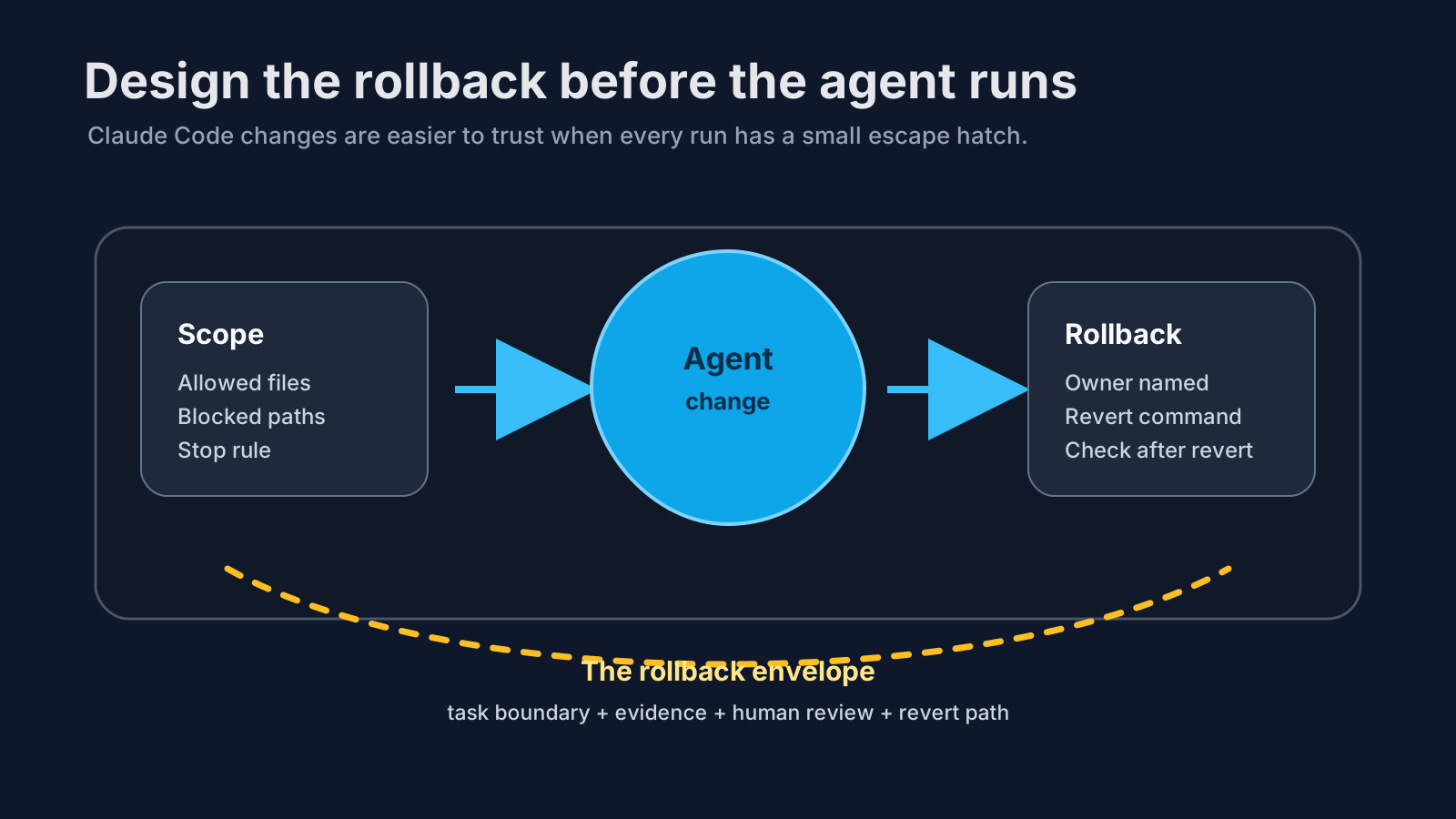
Most Claude Code prompts tell the agent what to change.
Fewer tell it how the team will undo the change if it is wrong. That omission looks harmless during a demo. In production-shaped work, it is where the anxiety starts.
The agent edits a service boundary. A test passes. The summary sounds confident. Then a reviewer asks the awkward question: “If this behaves badly in staging, what exactly do we revert?” If the answer is a shrug, the workflow was not finished. It only produced a diff.
Rollback belongs in the prompt.

A rollback plan narrows the work
A rollback instruction is not only an emergency note. It changes how the agent behaves while it is working.
Compare these two tasks:
Fix the flaky checkout retry logic.
and:
Fix the flaky checkout retry logic.
Stay inside api/checkout/** and tests/checkout/**.
Before editing, identify the smallest reversible change.
At the end, include the exact files changed, the test evidence, and the safest revert path.
Stop and ask before changing payment provider adapters, migrations, or shared retry utilities.
The second prompt does more than ask for a rollback. It makes the agent think in smaller pieces. It puts shared code behind a review gate. It also gives the reviewer something concrete to check.
That matters because a lot of agent risk comes from useful work spreading sideways. The model fixes the bug, notices a helper it dislikes, tidies a nearby abstraction, and suddenly the rollback is no longer one change. It is a little knot.
The diff should explain its own escape hatch
For agent-assisted work, I want the final summary to answer four boring questions:
| Question | Good answer |
|---|---|
| What changed? | Two files in the checkout retry path |
| Why was that enough? | The failing retry test now passes and the old behavior is covered |
| What did not change? | No provider adapters, migrations, or shared retry defaults |
| How do we undo it? | Revert this commit, then run the checkout retry test and one smoke check |
None of this is glamorous. Good. Rollback plans should be dull.
A dramatic rollback plan usually means the change was too wide. If the agent needs a paragraph to explain how to undo a routine bug fix, I would rather split the task before it touches anything.
Rollback is connected to permissions
This is where Claude Code permissions become practical instead of theoretical.
If the prompt says “do not edit migrations” but the tool permission still allows writes there, you have a policy suggestion, not a control. The agent may obey today and drift tomorrow. The safer setup is boringly consistent: the task says what is out of scope, the file permissions enforce it, and the review checklist checks it.
I wrote about this from the blast-radius side in Claude Code permissions: the production mistake that bites later. Rollback is the other half of the same habit. Permissions reduce the damage a run can cause. Rollback reduces the time you spend getting back to safety.
Make the agent name the owner
There is one human detail I like adding to production prompts: name who owns the decision after the run.
Not in a heavy process way. Just enough to stop the agent from treating approval as an abstract concept:
Human review: Thomas must approve changes to retry behavior before merge.
If the fix touches payment provider contracts, stop and report options instead of editing.
That small line changes the tone of the run. The agent is no longer trying to complete a task in isolation. It is preparing work for a named reviewer who has to live with the outcome.
In financial services, where I spent a lot of my engineering life, this kind of thing is normal. You do not get points for cleverness if nobody can unwind the change during an incident. AI agents do not remove that rule. They make it easier to forget.
Add rollback to your evals
If you already collect bad agent runs for evals, add rollback behavior to the case.
A useful eval might say:
Task: repair duplicate invoice validation.
Allowed paths: billing/validation/** and tests/billing/**.
Failure conditions:
- edits a migration
- weakens the duplicate invoice test
- changes shared billing defaults without approval
- finishes without a rollback note
Expected evidence:
- targeted test command
- changed files list
- revert path
That last failure condition is important. A run that produces a correct patch but no rollback note is not production-ready yet. It may be acceptable for a tiny local refactor. It is not enough for a workflow you want a team to trust.
Related: Claude Code evals should start with bad runs and Claude Code agents need a flight recorder. The flight recorder tells you what happened. The eval checks whether it happens again. The rollback plan gives you a way out when it still goes wrong.
The prompt template I would start with
For a production-shaped Claude Code task, I would start with something like this:
Task:
[one specific change]

Scope:
Allowed paths: [paths]
Blocked paths: [paths]

Evidence required:
Run [targeted command] or explain why it cannot run.
Report changed files and behavior verified.

Rollback:
Keep the change small enough to revert cleanly.
At the end, state the revert path and the check to run after revert.

Human review:
Stop before [risky action].
Ask before widening scope.
Do not perform cleanup outside the task.
This is not a magic prompt. It is a working envelope. The agent still needs judgment around it, and the tool permissions need to match the words. But it gives the run a shape reviewers can understand.
That is the standard I keep coming back to: can a tired engineer review, ship, and unwind this agent’s work without detective work?
If the answer is no, the agent is not ready for wider autonomy. Tighten the prompt, narrow the tools, and make rollback part of the job.
Related: the Claude Code review packet I want before approving agent work expands this into the full approval record: objective, permission boundary, tool trace, tests, cost, failures, and rollback.
If you are setting up Claude Code for a team, start with the free Claude Code production checklist. It covers the review, permission, observability, and rollback checks I would want before letting agents work near production code.
I'm writing the field guide for this work.
Claude Code: Building Production Agents That Actually Scale is about the system around the agent: permissions, MCP boundaries, evals, observability, cost controls, rollback, and human review.
Read the Amazon Kindle edition or start from the book landing page.