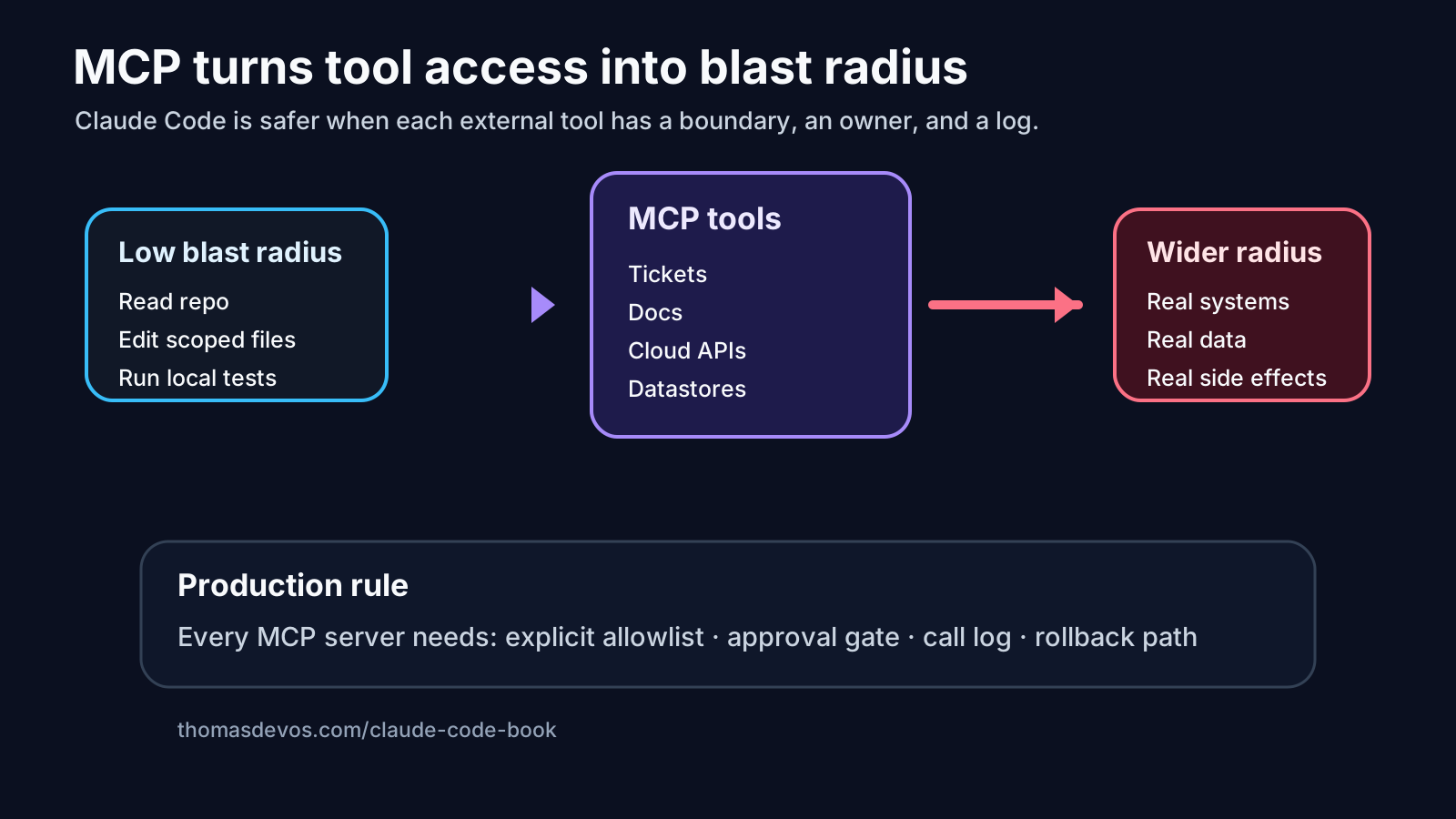
MCP is where Claude Code starts to feel less like a coding assistant and more like part of the engineering system.
That is the appeal. The agent can inspect docs, read tickets, query internal tools, understand service ownership, and connect the change it is making to the world around the repo. A good MCP setup can remove a lot of dumb friction.
It can also turn a small coding task into a production access problem before anyone notices.
The question is not “Do we trust Claude Code?” That question is too vague to be useful. The better question is: if this agent gets the task wrong, how far can the mistake travel?

MCP changes the shape of the risk
A local coding agent has a fairly understandable boundary. It can read files. It can edit files. It can run commands. You still need permissions and review, but the risk mostly lives inside the repository and the local environment.
MCP changes that.
An MCP server can expose the agent to a ticket system, a documentation store, a deploy tool, a cloud account, a database wrapper, a payments dashboard, a feature flag service, or an internal API. Some of those are read-only. Some can change state. Some look harmless until you remember they sit one thin layer away from production.
That is why I do not like MCP conversations that stop at “the agent can now use our tools”. Which tools? In what mode? Under whose identity? With what log? With what stop rule?
Tool access is blast radius.
Read-only is not always low risk
Teams often relax when an MCP server is read-only. Sometimes that is sensible. Reading public docs is not the same as writing to a production system.
But read-only access can still be too wide.
An agent that can read every customer ticket may pull sensitive details into a prompt. An agent that can read incident notes may expose credentials that should never have been written down. An agent that can inspect every service catalog entry may build a plan around systems it was never meant to touch. Even if it cannot write, it can still copy, summarize, leak, or reason from data outside the task.
For MCP, I want read permissions treated like code permissions: narrow by default, widened on purpose.
A safer setup says:
Allowed for this task:
- read the repository
- read docs tagged payments-validation
- read tickets in project PAY with label agent-ready
- run local tests

Blocked for this task:
- customer support tickets
- secrets and incident notes
- deploy or feature flag tools
- write access through MCP
That kind of boundary feels boring. Good. Boring boundaries are easier to review than heroic trust.
Write-capable tools need a separate approval gate
The risk line moves again when an MCP tool can write.
Creating an issue comment is one thing. Updating a feature flag is another. Triggering a deployment, changing a cloud resource, editing a customer record, or opening a pull request with generated code belongs in a different category.
Do not hide those actions behind one friendly label called “tool use”.
I would separate MCP tools into operating modes:
| MCP capability | Default posture |
|---|---|
| Read public project docs | allow inside a scoped task |
| Read internal docs for one service | allow with source logging |
| Read tickets for the current work item | allow with filtering |
| Comment on an issue or PR | approval for first runs, then limited automation |
| Change feature flags, cloud resources, deploy settings, billing data, or customer data | blocked unless there is explicit human approval |
| Access secrets or production databases | blocked by default |
A team can loosen some of this later. I would rather start strict and earn autonomy than start wide and discover the boundary during an incident review.
The call log matters as much as the final diff
A Claude Code diff does not tell you which MCP tools were used to produce it.
That matters. If the agent read a ticket, the reviewer should know which ticket. If it queried docs, the reviewer should see the pages. If it called an internal service, the reviewer needs the endpoint, mode, and result. If it tried a blocked tool, that should be visible too.
I want an MCP call log attached to any serious agent run:
MCP call log:
- docs.search: "payment retry contract" -> 4 results, 2 opened
- tickets.read: PAY-4821 -> linked to task
- service-catalog.read: billing-api -> owner and repo only
- feature-flags.write: blocked by policy
This is the same idea as the Claude Code review packet. The final artifact is not enough. Reviewers need the path the agent took, especially when the path crosses out of the repo.
Put MCP mistakes into evals
The best MCP evals will not come from generic benchmarks. They will come from your own uncomfortable runs.
Turn the bad cases into replayable checks:
- The agent tries to read a customer ticket when the task only allowed engineering docs.
- The agent asks for write access to a feature flag during a local bug fix.
- The agent uses a broad docs search instead of the service-specific source.
- The agent summarizes sensitive incident text into a PR comment.
- The agent claims a deploy tool was not used, but the call log says it attempted one.
Those are not abstract safety concerns. They are examples a team can test.
I wrote about this habit in Claude Code evals should start with bad runs. MCP makes that loop more important because the agent’s mistakes can involve systems outside the codebase.
A practical MCP blast radius checklist
Before giving Claude Code an MCP server, answer these questions in plain English:
- What can this server read?
- What can it write?
- Does it use a human identity, a service identity, or a task-scoped token?
- Which calls are logged in a place reviewers can see?
- Which actions require approval every time?
- Which actions are blocked completely?
- How do we revoke access quickly?
- What would rollback mean if this tool changed state?
The identity question is easy to skip and painful later. If the agent uses a broad human token, the logs may say Thomas did the thing even though the agent did it through Thomas’s session. That is bad for audit and bad for trust. Prefer scoped service identities where the platform allows it, with obvious names and tight permissions.
The production posture I want
For production-shaped Claude Code work, MCP should come with four defaults.
First, tool allowlists. The task should say which MCP servers and methods are allowed. No surprise tools.
Second, approval gates for write-capable actions. If the tool changes something outside the repo, assume a human gate until the team has evidence that automation is safe.
Third, call logs. If a reviewer cannot see the tool path, they cannot review the run properly.
Fourth, rollback notes. A write-capable MCP action should have a way back, or a clear reason why it should not be automated.
None of this makes Claude Code less useful. It makes the useful parts easier to defend. The best agent workflow is not the one with the most tools wired in. It is the one where the agent has just enough reach to do the job, and the team can see what happened.
If you are setting this up now, start with the free Claude Code production checklist. It gives you the core questions for permissions, review, evals, observability, cost, and rollback before an agent gets more room.
I am writing the deeper field guide in Claude Code: Building Production Agents That Actually Scale. It is for engineers who want Claude Code and MCP to survive contact with real teams, real systems, and real review.
Get Claude Code: Building Production Agents That Actually Scale on LeanPub, or start with the checklist if you want the lighter first step.