Claude Code MCP tools need a blast radius
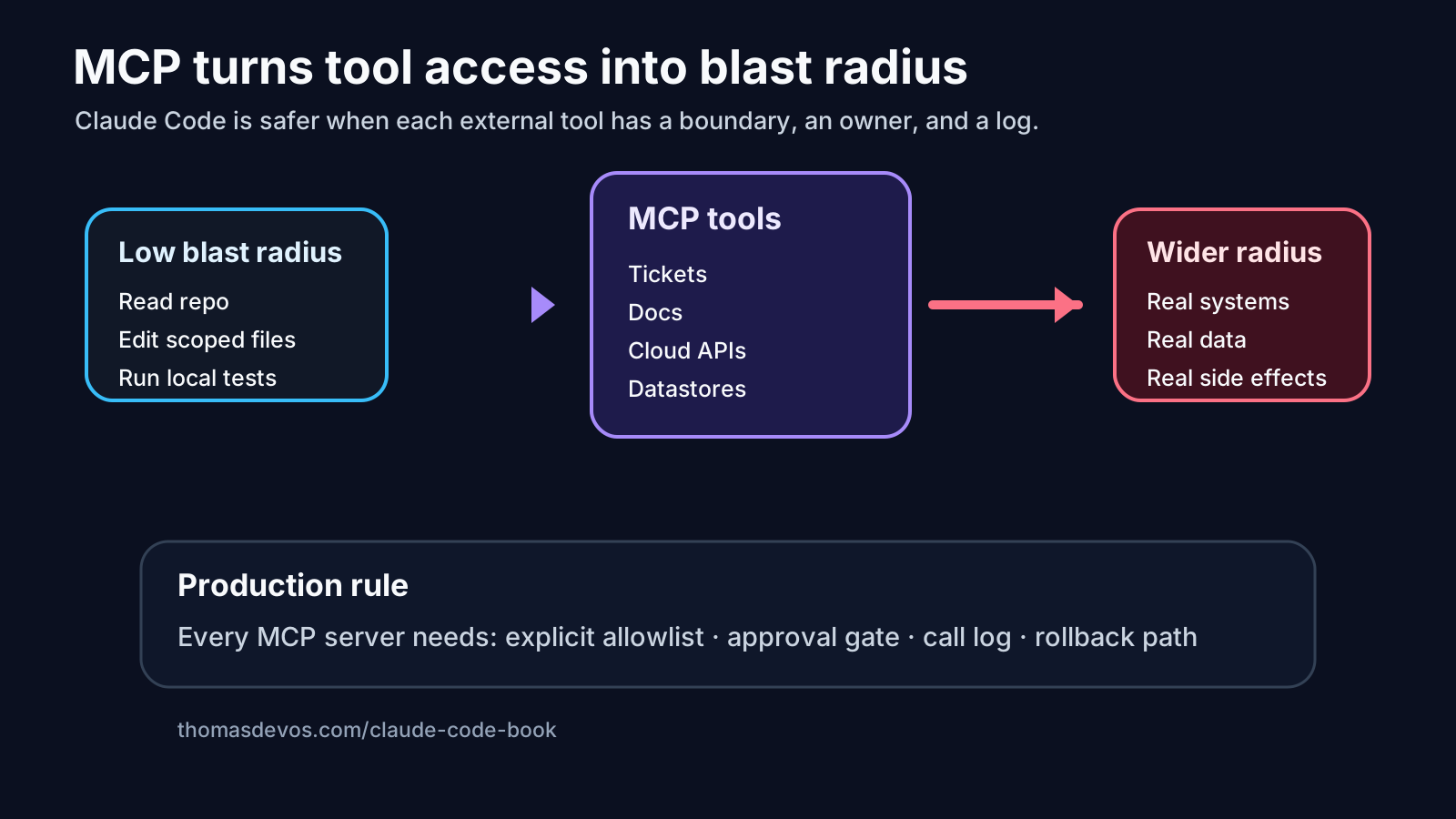
MCP is where Claude Code starts to feel less like a clever editor and more like a real teammate. It can read docs, inspect tickets, query internal systems, call tools, and stitch context together without a human copying half the company into a prompt.
That is powerful. It is also exactly where teams get sloppy.
The mistake is treating MCP tools as convenience buttons. “Let the agent see the repo, the docs, the backlog, the logs, maybe the cloud console, and it will figure things out.” Sometimes it does. Sometimes a vague task gets a much bigger surface area than anyone meant to approve.
If Claude Code can touch five systems, the prompt is no longer just a prompt. It is an access decision.

Tool access changes the risk model
A small coding task has a small natural boundary. Fix this test. Update this parser. Refactor this helper. Keep the diff boring.
MCP can quietly widen that boundary. The agent reads a ticket, follows a link to a design doc, notices a config mismatch, checks a deployment log, then edits code based on a chain of assumptions nobody reviewed.
That can be useful in a lab. In a production workflow, it needs a sharper question:
What can this agent do if the task is badly phrased?
Not if the model is malicious. Not if the vendor disappears into science fiction. Just if the task is ordinary and fuzzy, which is where most real work lives.
A tool that reads logs can leak context into the wrong decision. A tool that writes tickets can create false certainty. A repo-write tool can turn a support symptom into an architectural change. A cloud tool can make a local bug feel like an infrastructure incident.
The tool was not the problem. The missing boundary was.
Start with the task contract
Before adding MCP access, write the contract in plain English. It should be short enough that a reviewer can hold it in their head.
Goal: fix the failing invoice export test.
Allowed files: invoice export module and its tests.
Allowed MCP tools: read the linked ticket and the test-run artifact only.
Not allowed: production logs, cloud config, schema changes, unrelated refactors.
Stop if: the fix requires a contract change or another service owner.
Evidence required: changed files, commands run, why each tool was used, rollback note.
That is not bureaucracy. It is how you stop a helpful agent from becoming a roaming consultant with write access.
The important bit is not the exact format. It is the order. Decide the boundary first, then grant the tools. Do not grant the tools and hope the boundary appears later.
Read access still has blast radius
Teams often worry about write tools and relax around read tools. I understand why. Reading feels safe.
But read access changes what the agent can infer. If Claude Code can inspect internal docs, deployment notes, incident threads, logs, and tickets, it can build a story. The story may be right. It may also be a confident collage.
This matters in regulated or high-trust systems. In financial-services work, I have seen small pieces of context become dangerous when they travel without their original caveats. A runbook line written for one incident gets reused as a general rule. A dashboard note becomes “evidence.” A temporary mitigation starts looking like architecture.
Claude Code can accelerate that pattern unless the MCP boundary says what the source is allowed to prove.
A decent rule:
Every MCP read tool needs a reason, and every reason needs to survive review.
“The agent wanted more context” is not enough. “The failing test references ticket PAY-1842, so the agent may read that ticket and its attached acceptance criteria” is better.
Separate discovery tools from action tools
One simple control helps a lot: split tools into discovery and action.
Discovery tools can read narrow context. Action tools can change something. The two should not be bundled into one vague permission set.
For example:
Discovery allowed:
- read ticket PAY-1842
- read CI artifact for this branch
- search docs under /billing/export only

Action allowed:
- edit files under services/billing/export
- run npm test -- billing/export

Action not allowed:
- create tickets
- update production config
- edit database migrations
- call cloud deployment tools
This makes the review easier. If the agent used discovery tools, the reviewer asks whether the sources justified the patch. If it used action tools, the reviewer checks whether the change stayed inside the contract.
When discovery suggests the task is larger than expected, that should stop the run. The next step is a human decision, not a wider MCP grant hidden inside the same session.
Log the tool calls like you expect someone to read them
A Claude Code run with MCP should leave a trail that a tired reviewer can understand on Friday afternoon.
The trail does not need to be fancy. It needs to answer a few blunt questions:
Which tools were called?
Why was each call needed?
What did the agent learn?
What changed because of that evidence?
Which checks passed?
Which checks did not run?
What would be rolled back?
If the run cannot answer those questions, the team has a governance problem disguised as a productivity win.
This is also where observability becomes practical. I do not mean a shiny dashboard with token graphs. I mean a replayable record: prompt, tool calls, files touched, commands run, outputs, final diff, and reviewer decision.
Without that record, MCP access becomes folklore. People remember that “the agent fixed it,” but not which system it read, what it assumed, or where the boundary moved.
Give wider access a human gate
The safest phrase in an agent workflow might be this:
Requesting wider access ends the current run.
If Claude Code starts with ticket read access and later needs production logs, stop. If it starts with docs read access and later wants to edit a migration, stop. If it starts with a local test command and later wants cloud deployment state, stop.
That does not mean the request is wrong. It means the task has changed.
A human can approve a new run with a new contract:
New goal: investigate whether the failing export test reflects a schema contract change.
Allowed tools: read schema docs and staging migration history.
No code writes in this run.
Output: short finding and recommended owner.
Notice the shift. The agent is no longer pretending to fix the original problem. It is doing a bounded investigation.
That distinction saves review time and prevents the awkward diff where the agent fixed the test, updated the schema, rewired a helper, and left everyone wondering which part was necessary.
A working MCP policy for Claude Code teams
I would start with a small policy, not a grand platform document.
1. Every Claude Code run gets a task contract.
2. MCP tools are granted per task, not per developer preference.
3. Read tools need a named reason.
4. Write tools need a named scope.
5. Discovery and action tools are separated.
6. Wider access ends the run and requires human approval.
7. The run record must show tool calls, evidence, checks, and rollback.
That is enough to begin. You can add more once you see where the workflow actually bends.
The point is not to slow Claude Code down. The point is to keep the speed honest. A coding agent with MCP access can do excellent work, but only if the team can still answer a basic production question: “What were we allowing it to affect?”
If the answer is “whatever it needed,” you do not have autonomy. You have a blast radius problem.
For a compact pre-flight version of these boundaries, use the Claude Code production checklist. For the fuller operating model around permissions, review packets, evals, observability, rollback, and team adoption, see Claude Code: From Vibe Coding to Production.
Read the book: Claude Code: From Vibe Coding to Production on Amazon Kindle.
Want the operating checklist first? Start with the free Claude Code production checklist.