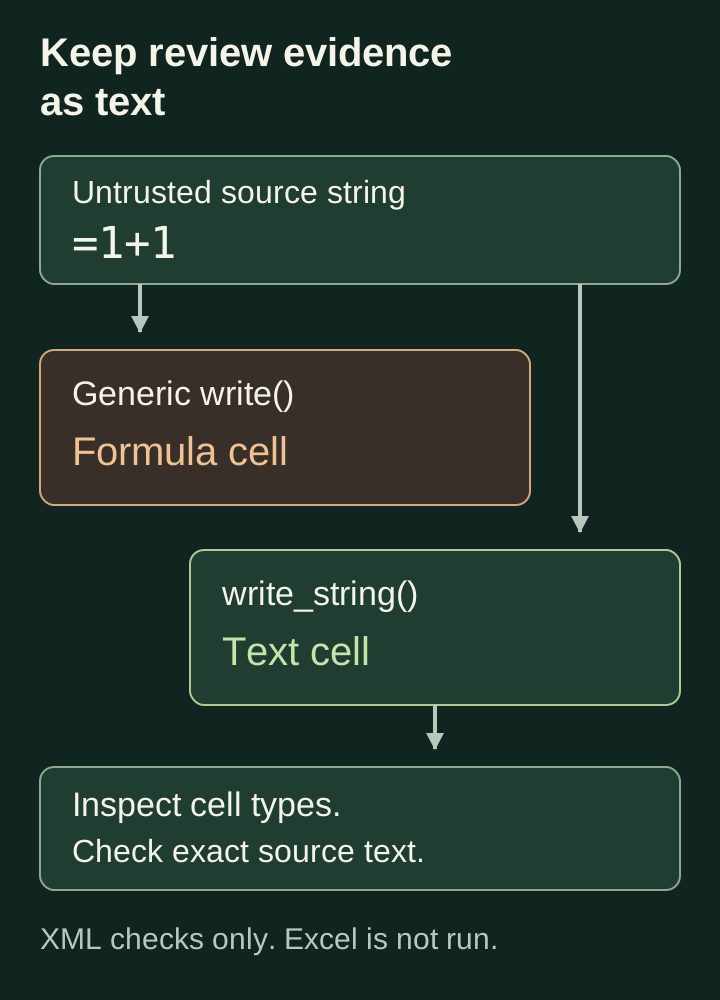
An agent collects support tickets, summarises them and exports a spreadsheet for human review. One ticket contains text beginning with =. The exporter writes that text through a convenience method, and the resulting workbook contains a formula where the reviewer expected evidence.
Human approval does not make that export safe. The reviewer has to open the file before deciding whether to approve anything. I would make every untrusted narrative column an explicit text column and test the generated workbook, rather than rely on a warning in the review instructions.
The example below is a constructed local fixture, not a reported incident in Claude Code or an MCP server. It demonstrates a cell-type conversion in XlsxWriter. It does not launch Excel, evaluate a formula or contact a website.
The exporter can change what a string means
XlsxWriter’s write() documentation describes a dispatcher that chooses between methods for numbers, strings, formulas and other cell types. By default, strings beginning with = are written as formulas. Recognised URLs are written as hyperlinks. Those defaults are useful when an application deliberately constructs a spreadsheet; they need attention when the cell contains a ticket title, retrieved passage or model response.
This is enough to emit a formula cell:
sheet.write(0, 0, "=1+1")
The example is deliberately harmless. The defect is that source content selects a cell type with different behaviour. Whether a particular formula can disclose data or cause other effects depends on the spreadsheet application, its version, settings and user actions. A generated formula element proves the export crossed the text boundary; it does not prove an exploit ran.
The agent need not invent the input. A document title or issue description can supply it, and a faithful summary workflow may carry it through unchanged. Asking the model to remove suspicious formulas makes the model responsible for a decision that the exporter can enforce directly.
CSV quoting solves a different problem
A CSV writer can correctly quote a field and still preserve its formula prefix:
writer = csv.writer(output, quoting=csv.QUOTE_ALL)
writer.writerow(["=1+1"])
Reading that CSV with Python’s CSV reader returns =1+1. The quotes preserve field boundaries; they do not attach a text-cell type for a spreadsheet application to honour.
OWASP’s CSV injection guidance describes formula interpretation in spreadsheet programs and warns that mitigations can change across applications or after saving and reopening a file. Its current guidance also discusses tabs inside quoted fields for Excel, with the cost that the tab becomes part of the data. Do not treat an apostrophe or a quoted field as a universal export guarantee.
For a review workflow under your control, an XLSX file with explicit string cells gives the exporter a cell-type contract to test. That choice does not make every XLSX file safe. It narrows this particular output boundary. If another system requires CSV, define its import contract separately and test the actual consumer, including any save-and-reopen step. Keep the original evidence outside that presentation conversion.
Run the cell-type check
Download and inspect agent-spreadsheet-text.py. It needs Python 3.9 or later and the tested XlsxWriter version:
python3 -m venv .venv
.venv/bin/python -m pip install XlsxWriter==3.3.1
.venv/bin/python agent-spreadsheet-text.py
.venv/bin/python agent-spreadsheet-text.py --test
.venv/bin/python -O agent-spreadsheet-text.py --test
The fixture creates two workbooks in memory. Both receive the same ten strings, including =1+1, a URL under example.invalid, a leading-zero identifier, quoted text and a multiline value. The first uses generic write() with its defaults. The second uses explicit string writes.
The demonstration prints:
{
  "generic_write": {
    "formulas": 1,
    "hyperlinks": 1,
    "cells": 10,
    "string_cells": 9
  },
  "explicit_text": {
    "formulas": 0,
    "hyperlinks": 0,
    "cells": 10,
    "string_cells": 10
  }
}
The hyperlink is also a string cell in the first workbook, so the counts are not mutually exclusive. The formula occupies the remaining cell.
Nine tests passed locally, normally and with Python optimisation enabled. The checks inspect worksheet XML and the shared-string table inside the XLSX ZIP container. They verify the formula and hyperlink counts, that every repaired cell has string type, and that the repaired values round-trip exactly for the fixture inputs. A CSV round-trip test separately demonstrates that quoting retains the leading =.
These are file-structure checks. They do not establish how every spreadsheet client renders, edits or re-exports the file. The inspector is written for this known single-sheet fixture, not for validating arbitrary uploaded workbooks.
Write text explicitly and check the return value
The repaired path disables implicit conversions on the workbook and calls the specific method for each narrative cell:
options = {
    "in_memory": True,
    "strings_to_formulas": False,
    "strings_to_urls": False,
    "strings_to_numbers": False,
}
with xlsxwriter.Workbook(output, options) as book:
    sheet = book.add_worksheet("Review")
    for row, value in enumerate(values):
        result = sheet.write_string(row, 0, value)
        if result != 0:
            raise ValueError("cell write failed: %s" % result)
The workbook options govern generic write() conversion. Calling write_string() makes the cell decision explicit even if workbook defaults change elsewhere. The options also reduce surprises if a later edit introduces a generic write into the same workbook. Neither prevents a developer from deliberately calling write_formula() or write_url() in another part of the export; review and test those paths too.
A leading-zero identifier such as 00123 stays text. A source URL remains visible without becoming a hyperlink in the generated file. If reviewers need clickable source links, construct a separate link column from validated provenance records. Do not automatically promote every URL found in a model response into a trusted navigation target.
The return-value check protects evidence integrity as well. The write_string() documentation specifies a truncation return code for strings longer than Excel’s supported limit. Silently shortening a ticket or retrieved passage can remove the qualification a reviewer needs to see.
This fixture uses a smaller application-owned limit of 1,000 characters per cell and 1,000 rows. It rejects empty strings, non-string values and unsupported control characters before constructing the workbook. Those are teaching constraints, not Excel limits. A real review export needs an explicit representation for missing values and a link to the full evidence when a cell cannot contain it. Do not silently clip source text to make an export pass.
The fixture materialises its input and builds the workbook in memory. It assumes an already bounded collection, so it is not a streaming memory-limit defence. Enforce input size before this function in a production ingestion path.
Keep calculations separate from source evidence
An operational review sheet may legitimately need formulas. Put application-authored calculations in separate columns or a separate sheet, with fixed templates and documented references. Keep source strings out of formula construction. Disabling automatic conversion does not help if code later builds "=" + model_output and sends it to write_formula().
Test each export column according to its purpose. A ticket ID needs identity preservation; a cost column needs a validated numeric value and currency; a narrative column needs text preservation. The earlier article on non-finite evaluation scores addresses numeric validation. Treating every field as text is appropriate for this fixture, but it would be an incomplete design for a typed financial report.
Retain the canonical run record independently of the workbook. A reviewer can edit a spreadsheet, and exporting it again may change its types. Bind the review decision to the underlying evidence and proposed action, as discussed in the Claude Code review-packet article. A file opened successfully is not proof that its contents still match the run.
Before adopting the exporter, open a disposable generated file in the spreadsheet application your reviewers use. Check the formula bar and hyperlink behaviour, save it, reopen it and inspect the resulting cell types again. Use harmless values such as the fixture’s =1+1; there is no need to introduce a live exfiltration destination to test whether text stayed text.
For the broader production approach to tool outputs and human review, see my Claude Code book.